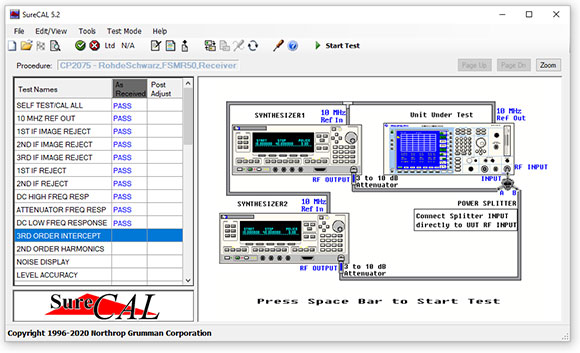
With its intuitive graphics, Flexible Standards interface, and live customer support, SureCAL® makes it easy to calibrate a wide range of equipment. It's off-the-shelf software with always-on assistance. That's why we're leading the way in automated calibration software.
SureCAL is the calibration solution developed by metrologists for metrologists. Our number one priority is customer satisfaction.
SureCAL's Test Executive has been completely rebuilt as a true Windows product. It's a new look with a familiar feel that's also fully compatible with Windows 7 and Windows 10.
Faster Automated Calibration with GPIB, USB, & LAN Flexible Standards using SureCAL's Test Manager 5.2.
What's new in 5.2
Faster Automated Calibration with GPIB, USB, & LAN Flexible Standards using SureCAL's Test Manager 5.2
Compatibility
Currently supports x32 & x64 versions of Windows 7 and Windows 10
Legacy SureCAL® Software still works!
SureCAL's Trademark Flexible Standards Technology
New Features
Operating System developed with Microsoft Visual Studio
Import multi-formatted files providing a paperless calibration solution
Archives are now stored in a standard PDF format for ease of exporting
Automated SureCAL® driver assignments of Flexible Standards
Manual custom driver assignments of Flexible Standards
SureCAL supports GPIB, USB, & LAN interfaces.
Advanced System Settings to fine tune your test performance based upon your hardware and software configuration
Instrument Drivers: The Key to Flexible Standards
No need to buy different calibration software from every calibrator manufacturer, when there is one software package that utilizes equipment from many manufacturers: Anritsu, Boonton, Fluke, Giga-tronics, Keithley, Keysight, Rhode & Schwarz, and Tektronix to name a few.
Can't find a calibration procedure? Contact us with your procedure request.
RF Components Package
Finally, a way to automate the calibration of RF Components in one convenient package!
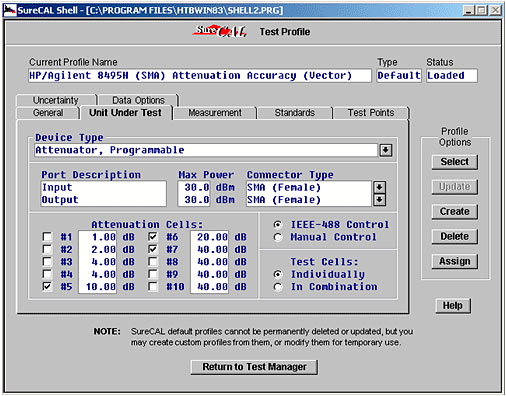
Using easy to read screens, operators have the flexibility to:
Select general measurement profiles or customize and save modified profiles
Define unit under test
Select measurement type
Select reference standards
Select test point optionsb
Select uncertainty calculation method
Select data output options
RF Components Supported:
Adapters, attenuators, coaxial bridges, bridge detectors, cables circulators, couplers, DC blocks, coaxial detectors, filters, isolators, mismatches, power dividers, power sensors (SWRonly), power splitters, RF switches, programmable switches and terminations.
Measurement Types Supported:
SWR, attenuation accuracy, attenuation flatness, attenuation linearity, conversion loss, coupling accuracy, coupling flatness, detector flatness, detector sensitivity, directivity, gain compression, high frequency roll-off, insertion flatness, insertion loss, isolation, low frequency roll-off, on/off ratio, passband flatness, S-parameters, tracking flatness.
Use typical test profiles or modify them to satisfy a variety of customer requirements.
Support
Renewable annual Software Maintenance Service is available to assure continued support. See pricing for details.
You probably know SureCAL for its leading calibration software — products that help you maintain your instruments to exacting precision. But we also have a human side, whose hallmark is unparalleled customer service. We believe in the value of an intelligent voice, so we feature live customer support. It's one more way SureCAL provides high technology with a human touch.
Calibration of Power Splitters using the SureCAL RF Components Package
Frequently Asked Questions
What are the System Requirements for SureCAL?
SureCAL requires a personal computer with the following minimum capabilities.
Software:
Microsoft® Windows (7 or 10) Operating System & utilities. The ENGLISH based installation must be used.
National Instruments NI-488.2 17.6 or above for Windows
TransEra HTBasic Runtime 8.3 or 10.1
Processor:
Match minimum requirements of the selected Operating System. RAM: Match minimum requirements of the selected Operating System or 2 GB.
Hard Drive:
500M bytes for SureCAL installation.
DVD-ROM Drive:
To load SureCAL software and periodic updates.
Display:
Super VGA display adapter, color monitor, 256 colors, with 1Mbyte of video RAM, 17” VGA color monitor, non-interlaced at 1024 x 768 pixels.
Keyboard:
101 key enhanced.
Interfaces:
Appropriate communication ports to provide printer interface and stimulus for measurement devices. SureCAL supports USB, Ethernet, VXI, RS-232 and IEEE488 Bus for measurement devices.
National Instruments GPIB adapter that is supported by the NI-488.2 for Windows v17.6 or above driver software.
Printers:
For printing 8.5x11 inch page reports, and for printing labels (optional).
Supplies:
Paper, standard 8.5 x 11 inch paper compatible with page printer. Labels, compatible with selected printer (optional).
Can I customize a Certification or Data Sheet with my company’s logo?
Yes, SureCAL allows users to modify Certs, Data Sheets, etc. with custom headings and logos BUT the customer’s logo will not print until they update their SureCAL.ini and report.txt files! Please reference the User’s Manual (which you can find under the Help Icon) for instructions on how to customize reports using SureCAL.
How can I use my bussed standard if it's not listed in the equipment list?
Contact SureCAL Metrology Engineering to see if a driver is available. If none are available, a driver can be written if the customer supplies an instrument and manuals.
Do the current SureCAL calibration procedures test all parameters and specifications outlined in the performance test and/or calibration section of the OEM's (Original Equipment Manufacturer's) manuals?
SureCAL develops automated performance tests which are based on the latest available OEM manual performance tests. The SureCAL test points, test methodology, recommended test equipment, and data sheet output are comparable to the OEM procedures. In cases where the OEM suggests a test methodology that is determined to be poor metrology, we make a decision on how SureCAL could improve the test. This is noted on our Software Development Data Sheet. Other differences would include adding the ability to substitute standards of an equivalent capability. And we may change the order of tests to minimize operator hookup changes and maximize the time savings of automating the calibration process.
Do the current SureCAL calibration procedures test all parameters and specifications outlined in the performance test and/or calibration section of the OEM's (Original Equipment Manufacturer's) manuals?
SureCAL develops automated performance tests which are based on the latest available OEM manual performance tests. The SureCAL test points, test methodology, recommended test equipment, and data sheet output are comparable to the OEM procedures. In cases where the OEM suggests a test methodology that is determined to be poor metrology, we make a decision on how SureCAL could improve the test. This is noted on our Software Development Data Sheet. Other differences would include adding the ability to substitute standards of an equivalent capability. And we may change the order of tests to minimize operator hookup changes and maximize the time savings of automating the calibration process.
Assuming no substitution of standards (and / or using substitutions of equivalent or better) are the existing procedures written to provide a Test Accuracy Ratio (TAR)/ Test Uncertainty Ratio (TUR) of 4 to 1 or greater? Are deviations from this noted in the data sheet?
SureCAL has automatic TAR/TUR calculations for low frequency AC/DC test equipment such as DMMs with options to guardband the specs when TAR/TUR drops below 4:1. The TAR/TUR is printed on the data sheet with the measured data and specs. High frequency test equipment is more controversial when it comes to calculating the test accuracy ratio. We are working toward making this a user manageable option to select an uncertainty budget and choose the method of calculating and reporting uncertainty to comply with the new international standard ISO/IEC 17025. Presently TAR/TUR is not an automatic function in SureCAL High Frequency Test Equipment procedures. There are exceptions, but following the OEM procedure is usually considered sufficient. In cases where an audit has revealed that the OEM test methodology fails to achieve an acceptable test accuracy ratio, SureCAL Metrology Engineering makes a determination on what alternate test methods and/or standards should be required to support the measurement in question.
What is the average time savings?
Substantial. All tests are automated. Using SureCAL, a technician can easily test a Spectrum Analyzer in an average of 2 to 4 hours. For some tests the run time is less than half the manual calibration time.
Can I run multiple copies of Test Manager? Will other applications running in background interfere with Test Manager?
Multiple copies of Test Manager should not be run, but other programs can run in the background with no effect on SureCAL.
In the News
SureCAL® 5.2
SureCAL's Test Executive has been completely rebuilt as a true Windows product. It's a new look with a familiar feel that's also fully compatible with Windows 7 and Windows 10.
Some of the new features include:
Datasheets now stored in PDF format.
A datasheet converter to convert previous versions of SureCAL datasheets to PDF.
VXI, USB, Serial COM Ports, GPIB and TCP/IP capable communication.
New and improved graphical interface to select flexible standards.
Improved speed and performance.
Backward compatible with procedures developed with Test Manager 5.0 and 5.1.
Currently supports x32 & x64 versions of Windows 7 and Windows 10